Product line · 02Mac tools

Mac Tools

Seven utilities that each answer one annoyance, work without a network, and stay out of the way until you need them.

7 products 1 in early access macOS Free during launch Coming to the iOS App StoreView on the iOS App Store

Free during launch Every app is free for a limited period right now — macOS, Windows and browser builds, and the iOS build by sideloading. No account, no key.

The iOS build is installable now by sideloading: it needs a computer and a free Apple ID, and it has to be re-signed roughly weekly. Installation notes come with the build; ask if anything is unclear.

None of these replaces a system utility that already works. Each one exists because a specific thing on macOS was slow, awkward or missing — and because it could be built properly by one person without a subscription strategy attached.

Products
7 released
Runs
Offline, no account
Source
All free during launch
Telemetry
None in any build
Buyer
People who use the Mac all day

01The tools

Six that fit on one page

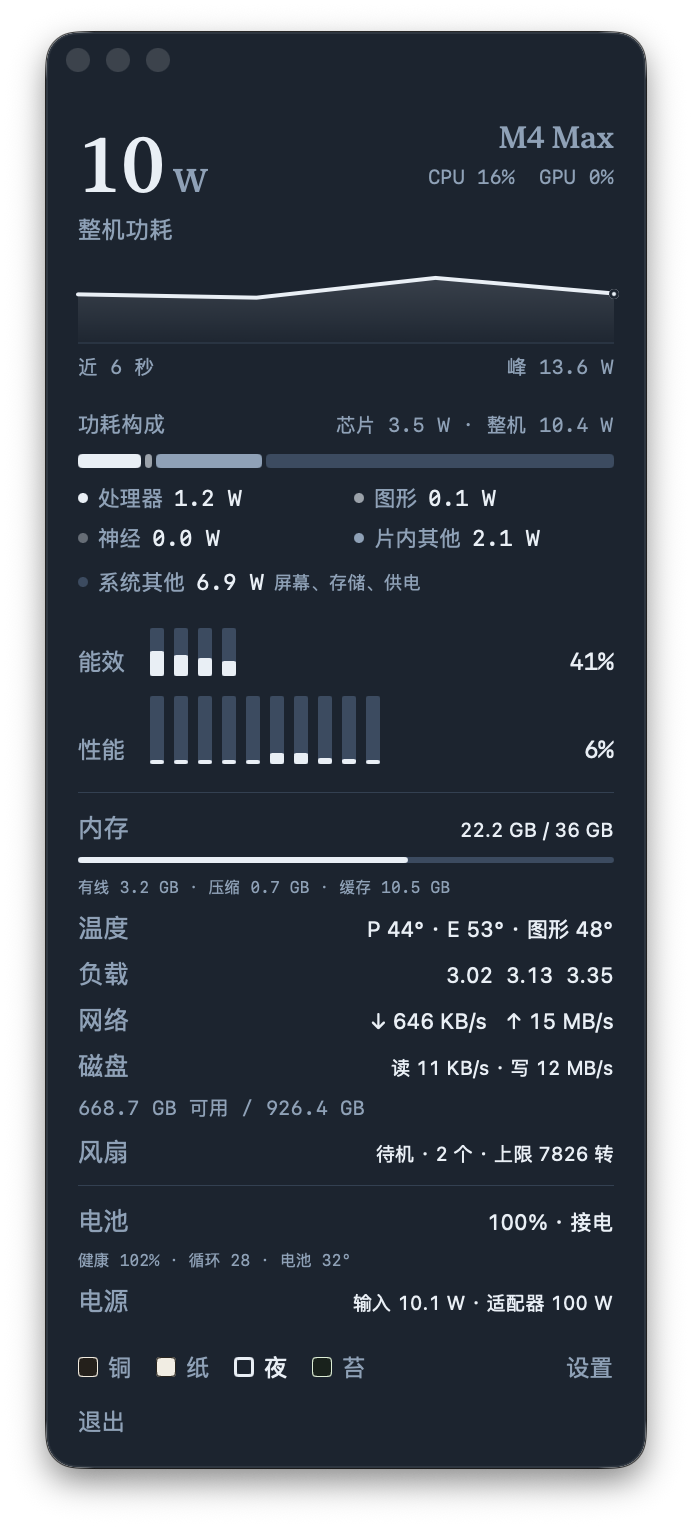
Menu-bar telemetry has its own section below, because a 692 × 1528 panel deserves one.

0.1.0 Free now

Findarium 寻册

Point it at your folders. Find any document again with a sentence.

PDF, DOCX, XLSX, PPTX, Markdown, TXT, CSV and HTML extracted into one SQLite library with full text, FTS5 and local semantic vectors. Chinese keywords work. Encrypted files are annotated, never broken into.

Download · coming soonDownload
Open core (MIT) · macOS GitHub
0.4.0 Free now

Caelum

The file manager Finder should have been.

Four view modes and quad-pane layouts, tabs, per-directory column widths. Batch rename with regex and live conflict checks, archive and extract, four hash algorithms, a 50-entry undo history and a serial task queue.

Download · coming soonDownload
macOS 15+ · Windows Paid edition later
0.2.0 Free now

Wiretoss

Mac ↔ Windows file transfer over your own LAN. No cloud, no sharing setup.

One Rust binary, browser UI, saturates the link. Optional native client mode sends to a chosen device. Checksums are published with every archive. iOS and Android builds too.

Download · coming soonDownloadDownload · coming soonDownload
Open core (MIT) · macOS · Windows · iOS · Android GitHub
1.0.0 Free now

FastZipLite

An archiver that opens instantly and does not put a subscription in your menu bar.

Extracts ZIP, 7z, TAR, TAR.GZ, TAR.BZ2, TAR.XZ, RAR/RAR5, ISO and cpio, detecting format from content. Compresses to ZIP with AES-256, TAR, GZ, BZ2, XZ. 1–3 MB, no external dependencies.

Download · coming soonDownloadDownload · coming soonDownload
macOS 13+ · 3.4 MB Paid edition later
Early access Free now

ShadowFS

A read-only shadow file system laid over your real files — virtual folders, virtual names, natural-language search.

The real files never move: no code path deletes, renames or moves them. With no model it falls back to FTS5 and deterministic vectors, and says so on its own status page.

Download · coming soonDownload
macOS · Python · 0.1.0 Read the rules
0.1.0 Free now

Photo Organizer 手机照片整理器

Untangle years of phone photos: classify by device, find duplicates, rename from metadata.

Byte-identical and perceptual-hash duplicates, with cross-phone reporting. Detects screenshots, thumbnails and junk. Moves files rather than deleting them, writes a JSONL operation log, and undoes in one command.

Download · coming soonDownload
macOS · Python · CLI + GUI Paid edition later

02Menu-bar instrument

机况 MacMonitor

Package power, per-core load, temperatures and fan speed, in the menu bar. The panel breaks the same numbers down: whole-machine and SoC power with a CPU/GPU/Neural split, efficiency and performance core load, memory pressure, network and disk throughput, battery health and adapter input.

  • Four themes, separate font scaling for the top readout, power block, cores and readouts.
  • Areas can be hidden individually — a menu bar that only says one number is a valid configuration.
  • Developer ID signed and notarised. No network, no admin rights, no special permissions.

Read the full MacMonitor page

macOS 14+ Apple Silicon 0.4.0 Free during launch Coming to the App StoreView on the App Store Download · coming soonDownload
The 机况 MacMonitor panel: whole-machine power at 10 W with a 90-second curve, a power composition bar, efficiency and performance core bars, memory, temperatures, load averages, network and disk throughput, fan RPM, battery health and adapter input.
Real panel · v0.4.0, M4 Max

03ShadowFS · early access

Three contracts, quoted rather than paraphrased

The product is the guarantees, not the interface. These are the three it is built around.

C1

The real file system is read-only

No code path deletes, renames or moves a real file. The shadow layer is a view; if the view is wrong, the files are still where they were.

C2

The shadow belongs to the system, the view belongs to you

Naming proposals are immutable. Once accepted, a view is user-owned; a shadow name you edited yourself is marked manual and is never overwritten by later naming passes.

C3

Usable offline, and honest when degraded

With no model installed it falls back to FTS5 and deterministic hash vectors, and the status page says "degraded, no model" out loud rather than quietly returning worse results.

Status

Early access. P0 through P2 are implemented and tested locally; P3 — projection into the system file manager — has not started. It is listed here because it is real and useful now, not because it is finished.

04Requirements

What each one needs

Platforms and licence
ProductPlatformLicenceSource
FindariummacOSOpen core (MIT)github.com/humorwuwu/Findarium
CaelummacOS 15+ · WindowsPaid edition laterNot public
机况 MacMonitormacOS 14+, Apple SiliconPaid edition laterNot public
WiretossmacOS universal · Windows x64 · iOS · AndroidOpen core (MIT)github.com/humorwuwu/Wiretoss
FastZipLitemacOS 13+Paid edition laterNot public
ShadowFSmacOS (Python) · early accessPaid edition laterNot public
Photo OrganizermacOS (Python), CLI + GUIPaid edition laterNot public

Every build is free during launch. The licence column says what each product becomes afterwards — open core stays MIT (core only), proprietary editions stay paid.

Photo Organizer has not been notarised by Apple yet. On first launch macOS will ask you to confirm — Gatekeeper has not seen the binary, and that is what the prompt means.

05Next

Take one for a week

Everything on this line is free during launch, so the useful question is which one you would keep. Ask for the build and we will send the installer and any notes it needs.

humorwu@163.com